Registering links the battery to your account. It makes you its owner, starts the warranty, and lets you open support cases and request Ermis Cloud.
Register in Battery Monitor
Sign in and connect
Sign in with your account (not as a guest), then connect to the battery over Bluetooth. Registering needs the Bluetooth connection: the app reads the battery's serial number and code from the battery itself. Check that the serial matches the label.
Open Register battery
On the dashboard, tap Register battery on the card that says This battery isn't registered, or open ⋯ → Register battery.
Enter the date of purchase
Choose the Date of purchase as it appears on your invoice or receipt. It can't be in the future.
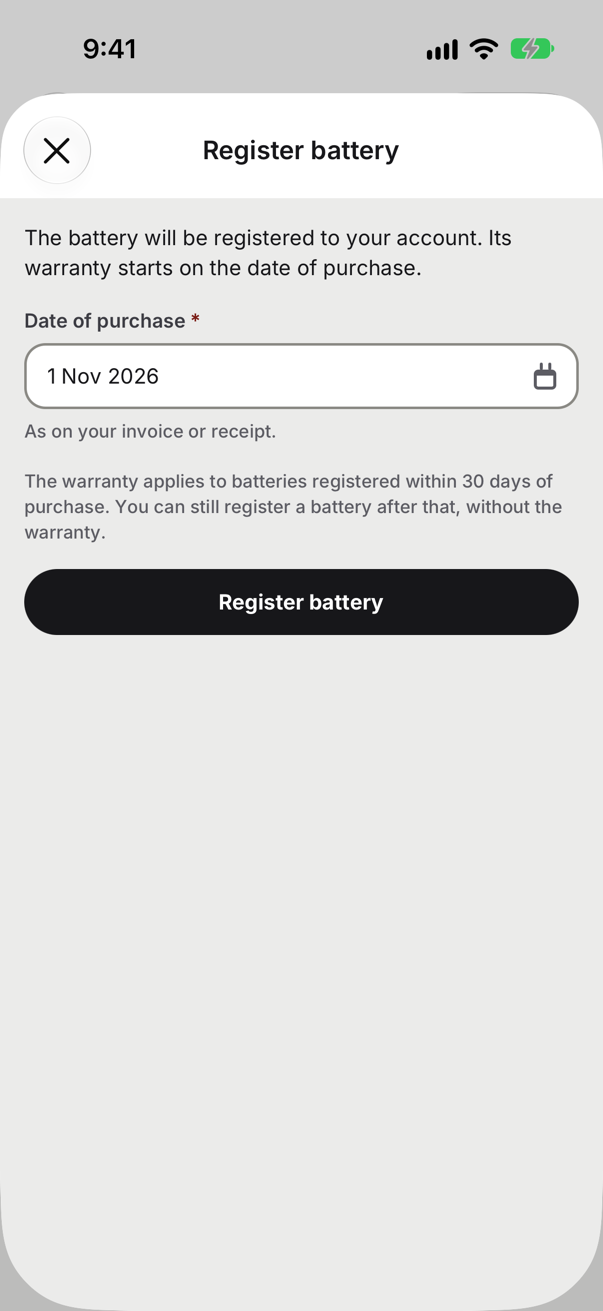
Register battery Tap Register battery
The app says Battery registered. The battery is now yours.

Good to know:
- The first person to register a battery becomes its owner; nobody else can register it after that. If you bought it second-hand, take it over with a transfer code.
- In a bank of batteries, register each battery separately.
- An installer can help at handover, but the battery should be registered to your own account.
- Can't use the app? Email the serial number and your proof of purchase to info@batterieslab.gr within 30 days of purchase.
See the warranty
Open ⋯ → Warranty. It shows one of:
- In warranty, until a date or a number of cycles, whichever comes first;
- Warranty ended, on a date or at 6,000 cycles;
- Not covered by the warranty, when the battery was registered more than 30 days after purchase.
It also shows the cycles counted so far and the product code.

How the warranty is counted
- It lasts 5 years or 6,000 cycles, whichever comes first, for a battery registered within 30 days of purchase.
- The 5 years start on the date of purchase you entered. A battery registered without one counts from the day it was registered.
- The cycles are the ones the battery's BMS counts, as Battery Monitor last sent them.
- The warranty stays with the battery when it changes owner, with its original date of purchase.
The full terms are on account.batterieslab.gr/warranty.
Make a warranty claim
From a registered battery, open ⋯ → Warranty request and describe the problem; see Support cases. Or email info@batterieslab.gr with the serial number, the email of your app account, your proof of purchase, a description and photos.